Choose a model you want to finish
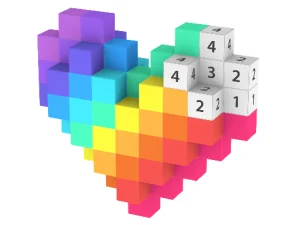
Pixel Art 3D provides model subjects such as animals, vehicles and food. Begin with a subject that interests you, then inspect the numbered areas that are visible. The supplied pattern gives the activity a structure and a clear reason to select one colour at a time.
Look at a recognisable part of the model before filling. Working toward completing a small section can make progress easy to see. You do not need to understand the entire colour arrangement immediately to begin with one visible group.
The activity uses prepared numbered blocks. Choose it when following a pattern is what you want to do, rather than expecting an unrestricted drawing canvas or a separate modelling editor. The useful creative choice is which model to explore and how to work through its colour groups.
Match the selected colour with the number
The publisher documents mouse controls. Select the colour you intend to use, then press and hold matching numbered blocks to fill them. Try a clearly visible group first so that the response confirms which colour is active.
If a block does not behave as expected, compare its number with the selected colour before repeating the action. That check answers a specific question about the current selection. Moving the pointer repeatedly over an incompatible group will not clarify which colour should be used.
Watch the filled area after a held movement. It gives feedback about which blocks the input reached. Use that result to decide the next small section, keeping the selected colour and the area you are working on connected in your attention.
Work through a recognisable area
Choose a cluster whose outline you can follow. Filling connected or nearby blocks makes it easier to notice which pieces remain. Switching colours without a purpose can scatter your attention across the model and leave several small groups to find later.
When you change colour, take a moment to locate the new matching number before holding the pointer over blocks. That short check keeps the next action deliberate. It also makes a misplaced assumption easier to spot before you spend time searching the wrong group.
A section that looks mostly complete may still contain a separated numbered block. Inspect the edges of the area and the small details you can see. The final few pieces deserve the same matching check as the large groups that were obvious at the beginning.
Confirm the artwork with the game's own feedback
Near completion, scan for remaining numbered groups instead of relying only on the overall appearance. A model may look colourful before every intended block has been filled. Let the current game's completion response confirm the result.
For a short session, aim to finish a recognisable section or understand one colour's matching action. For a longer visit, work through the full prepared pattern. Check any progress information provided before assuming an unfinished model will be preserved when changing devices.
Use the other Pixel Art cards to compare another kind of colouring or pattern task. Read their objectives and controls separately, since a shared art theme does not establish identical filling rules. In this version, the starting routine is straightforward: select the intended colour, confirm the number and examine the filled result before choosing the next group.
Before changing the selected colour, scan the current visible group for a small block that may have been missed.