Start with Evo-F5 itself
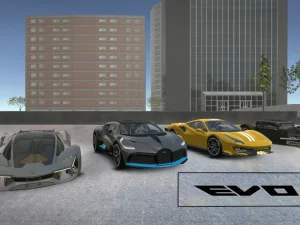
Evo-F5 provides a city environment where you can drive different vehicles and create your own small experiments. The publisher describes sports cars, a truck with trailer, a forklift and a historical car associated with restoration. The working vehicles add object positioning and transport to the driving possibilities. Begin with the role you want to explore instead of assuming every machine should be driven like the first car you selected.
Read the loaded game's current controls. The documented functions include C for camera, Space for handbrake, R for repair, Enter for action or reset and T for slow time. Working-vehicle controls need attention to the selected machine, with the publisher listing I, K, J and U for fork-related operation. Test unfamiliar commands in a clear area. Repairing a car and resetting its situation should be understood as different actions rather than interchangeable guesses.
Give open driving a practical goal
A city sandbox can feel aimless if every attempt begins with maximum acceleration and ends at the first obstruction. Choose a recognizable starting point, a turn and an endpoint. Drive that short route at a manageable pace and notice how the vehicle finishes each movement. If you want to change cars, the same route gives you a useful comparison. You can describe a wider turning approach or a different recovery without inventing a performance statistic.
Keep the camera stable while learning a route. A change in viewpoint can make the space easier to read, but switching constantly also changes the reference you use for steering. Select a view that reveals what your present task needs. A truck and trailer can require more attention to surrounding clearance than a short car. The most suitable view is the one that helps you understand the maneuver you are attempting.
Explore customization without confusing its effects
The publisher describes appearance choices, vehicle components, driving assistance and telemetry. Inspect the actual menu and distinguish a visual preference from a change you expect to affect driving. If you alter a component, return to the reference route and compare one thing at a time. Several simultaneous adjustments can create a different result while making it impossible to tell which adjustment mattered.
Traffic and vehicle destruction are also described as options that can be activated. Check whether they are enabled in the current session. A route with other vehicles is a different test from an empty street, so keep conditions consistent when comparing setups. Read any information about saving or sharing a setup before assuming it follows you to another browser. None of these experiments requires you to download a configuration from an unfamiliar player.
Choose a different driving task deliberately
Other cards in the collection can provide a change of pace, but inspect their individual rules before transferring Evo-F5 techniques. A timed route, a parking task or a different camera perspective may ask for a different approach. Check the documented device inputs too; a webpage opening on a phone is not proof that the embedded game supplies touch steering. Let the selected player's instructions establish what is supported.
The Evo-F5 practical guide develops city-route practice, working-vehicle preparation and recovery. Use it when you want to turn free driving into a clear question. Then judge an attempt by the task you chose: a controlled turn, a useful vehicle comparison or an object moved with understanding. That makes the collection a route toward purposeful play rather than a promise that every driving card offers identical features.