Recognise the version and choose the next action
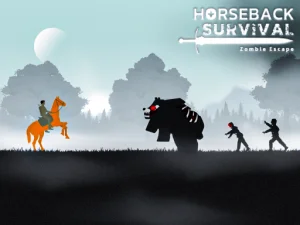
Ertugrul Gazi Horse Sim opens the Horseman version described here. Its own overview lists five horses and three weapon types: a bow, a sword and a gun. Inspect the available selections and current area before moving toward an encounter.
The established catalogue title does not turn this build into a verified historical campaign. The cowboy-and-zombie scene is the practical reference for the instructions. Pay attention to what the player actually presents when choosing a weapon or interpreting the next objective.
Begin with a little space around the character so that you can recognise the response to one input. Riding movement, mounting and an attack each provide different information. Learning them separately gives a later combined movement a clearer purpose.
Understand the difference between mounting and dismounting
WASD or the arrow keys moves. Space jumps and Left Shift sprints. F mounts the horse, while holding F dismounts. The distinction between a press and a hold is worth testing deliberately before using it during a busy encounter.
Watch which state the character is in after the action. A movement made on foot and one made while mounted need to be understood in their current context. Confirm the mount or dismount response before adding a sprint or changing weapons.
If an action seems not to occur, check your position and the current scene instead of immediately repeating every key. You want to know whether the intended state change happened. That makes the next movement an informed choice rather than a guess about what the character is doing.
Let the weapon influence the approach
Use 1, 2 and 3 to change weapons. The left mouse button attacks, and the right mouse button performs the secondary attack or aiming action appropriate to the selected weapon. Check that selection before approaching a zombie, since a bow, sword and gun call for different positioning.
Look beyond the closest enemy before choosing a direction. A route is easier to read when it keeps the target visible and leaves room to continue or turn. Closing the distance without considering the next movement can make the resulting encounter harder to manage.
Try one weapon for long enough to understand its documented actions before switching repeatedly. If an attack does not produce the result you intended, consider the current selection, position and input separately. A weapon change is useful when you know what different action you want to make possible.
Keep the view and the movement manageable
L toggles cursor locking, M controls sound, and Esc or Tab returns to the main menu. Learn those interface commands when you can watch their effect clearly. An unlocked cursor or a menu changes the context in which another mouse movement will occur.
During an early session, choose a small practical aim such as mounting reliably or maintaining a readable route around one encounter. You can evaluate that aim without assuming a particular mission count, equipment upgrade or hidden reward.
Use the Horse collection to explore another riding activity when you want a change. Check whether the selected title focuses on travel, a course or combat, and read its controls anew. In Horseman, the useful starting combination is knowing whether you are mounted, which weapon is selected and where the next movement should leave you.